E-invoicing does not have to mean replacing the accounting system your team already knows. MATI e-INVOICE sits beside Tally, Peachtree, Sage 50, Odoo or whatever you run today, takes the invoices you already produce, and submits them electronically through an accredited service provider. Your team keeps working exactly as it does now — the compliance happens behind them.
الفوترة الإلكترونية لا تعني بالضرورة تغيير النظام المحاسبي الذي يعرفه فريقك. يعمل MATI e-INVOICE إلى جانب Tally أو Peachtree أو Sage 50 أو Odoo أو أي برنامج تستخدمه اليوم، يأخذ الفواتير التي تصدرها أصلاً ويرسلها إلكترونياً عبر مزوّد خدمة معتمد. يواصل فريقك عمله تماماً كما هو — والامتثال يحدث خلفهم.
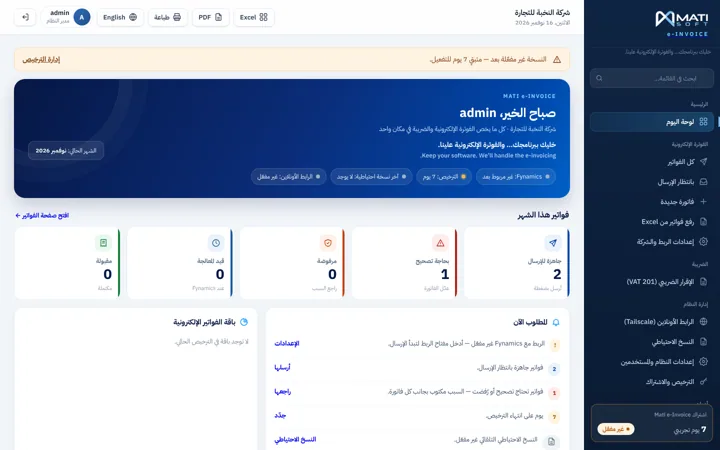
The opening screen counts this month’s invoices in five states — ready to send, needs correction, under processing, rejected and accepted — and tells you in plain language what to do next. Nothing is buried in a log file.
تحصي الشاشة الأولى فواتير الشهر في خمس حالات — جاهزة للإرسال، تحتاج تصحيحاً، قيد المعالجة، مرفوضة، ومقبولة — وتخبرك بلغة واضحة ما الخطوة التالية. لا شيء مدفون في ملف سجلّات.

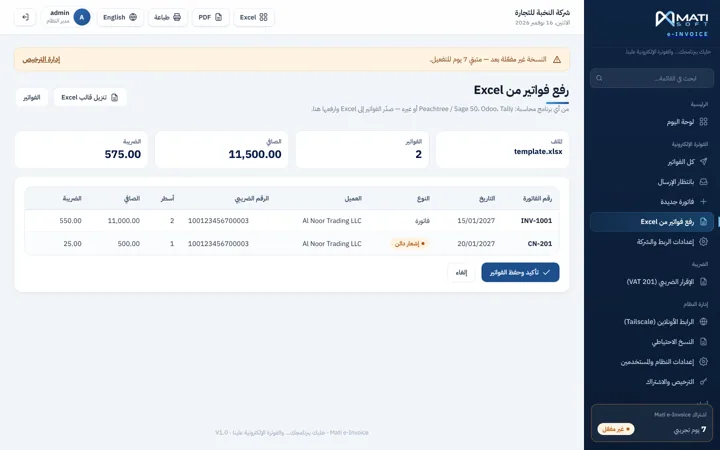
Export from your accounting software the way you already do, drop the file in a watched folder, and the program picks it up, reads the lines, shows you the totals and tax, and waits for a single confirmation before anything is sent. One template covers tax invoices and credit notes.
صدّر من برنامجك المحاسبي كما تفعل أصلاً، وضع الملف في مجلد مراقَب، فيلتقطه البرنامج ويقرأ السطور ويعرض عليك الإجماليات والضريبة، وينتظر تأكيداً واحداً قبل إرسال أي شيء. وقالب واحد يغطّي الفواتير الضريبية وإشعارات الدائن.

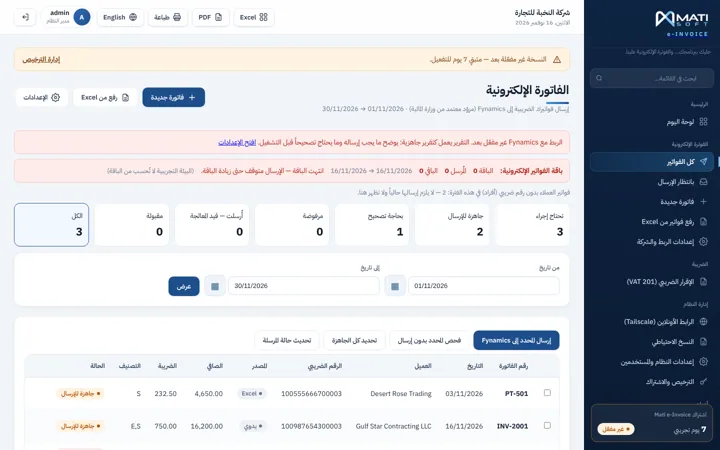
One list holds every invoice with its number, date, customer, tax number, net, tax, source and current status — searchable, filterable by date, and exportable. You can send a selected batch, re-check status, or fix and resend the ones that came back for correction.
قائمة واحدة تضمّ كل فاتورة برقمها وتاريخها والعميل والرقم الضريبي والصافي والضريبة والمصدر والحالة الحالية — قابلة للبحث والفلترة حسب التاريخ والتصدير. يمكنك إرسال دفعة محدّدة، أو تحديث الحالة، أو تصحيح ما عاد للتصحيح وإعادة إرساله.

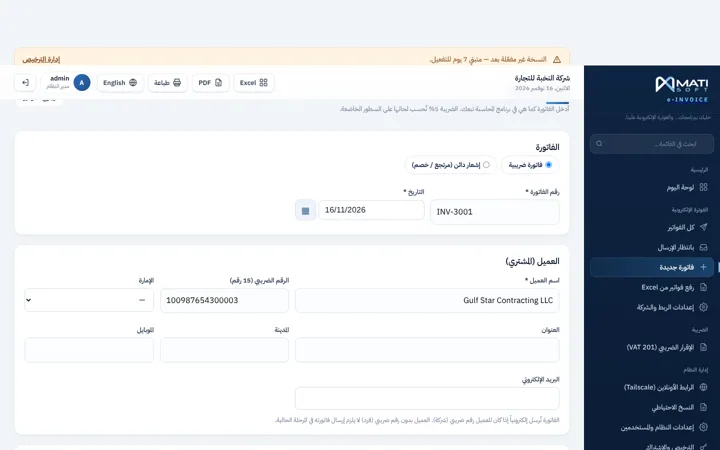
Not everything comes out of an export. A one-off invoice or a credit note can be entered directly — buyer name, tax number, emirate, line items — and sent on its own, without touching the accounting system at all.
ليس كل شيء يخرج من ملف تصدير. يمكن إدخال فاتورة مفردة أو إشعار دائن مباشرة — اسم المشتري، الرقم الضريبي، الإمارة، البنود — وإرسالها وحدها دون المساس بالنظام المحاسبي إطلاقاً.

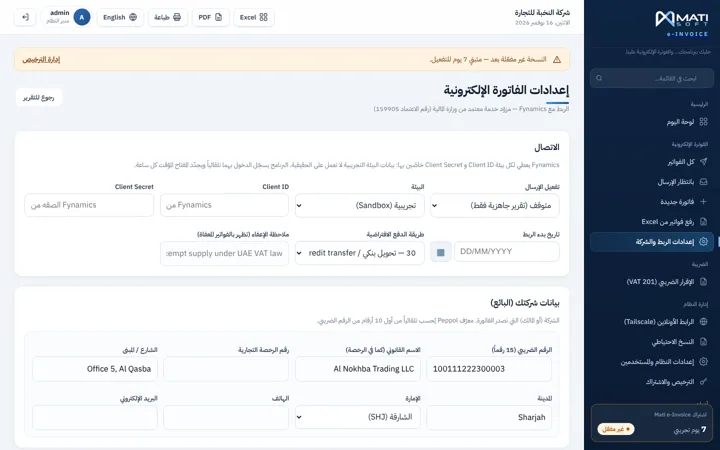
If you invoice under more than one licence, each company keeps its own tax number, its own trade details and its own annual invoice package — on the same installation. A sandbox mode lets you test the whole flow before a single real invoice is submitted.
إذا كنت تفوتر تحت أكثر من رخصة، تحتفظ كل شركة برقمها الضريبي وبياناتها التجارية وباقتها السنوية الخاصة — على نفس التركيب. ووضع التجربة يتيح اختبار المسار كاملاً قبل إرسال أي فاتورة حقيقية.

A single setup file installs everything the program needs — nothing has to be prepared on the machine first. It then runs quietly in the background with Windows, with no console windows flashing on screen, and your staff only open it when they want to look at something.
ملف تركيب واحد يثبّت كل ما يحتاجه البرنامج — لا شيء يجب تجهيزه على الجهاز مسبقاً. ثم يعمل بهدوء في الخلفية مع الويندوز، بلا نوافذ سوداء تومض على الشاشة، ولا يفتحه موظفوك إلا حين يريدون الاطلاع على شيء.

Get in touch to book a live demo or receive a detailed quotation for your company.
تواصل معنا لحجز عرض توضيحي مباشر أو للحصول على عرض سعر مفصّل لشركتك.